Tharunam User Guide
📖 INTRODUCTION
Tharunam is Siva Foundation's digital platform for recording donations and expenses. This comprehensive guide helps you record donations step-by-step, ensuring accurate and organized record-keeping for reconciliation with bank statements.
This user guide is designed for:
- Individual donors wanting to record their contributions
- Foundation volunteers managing donation records
- Anyone needing assistance with the Tharunam donation entry process
📍 TABLE OF CONTENTS
⚡ OVERVIEW OF LOGIN AND DONATION
The donation recording process consists of 12 simple steps. By following this guide, you ensure:
- Accurate donation records linked to bank transfers
- Proper documentation through receipt uploads
- Organized financial project management
- Easy and automated bank reconciliation
Visual Guide
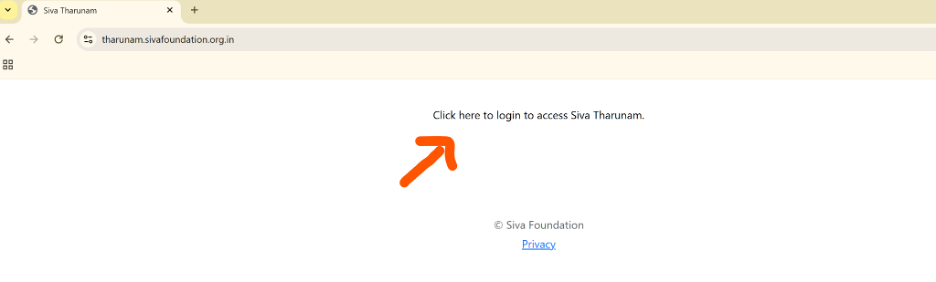
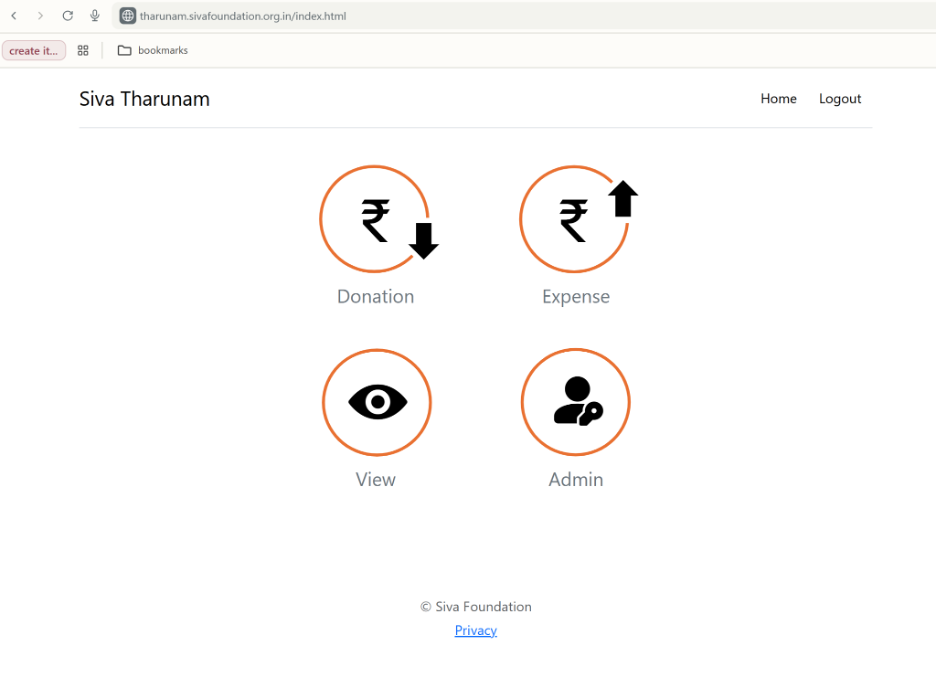
The screens below show the login and main donation form layout.
Key Sections:
- Donor Information: Basic contact info (Name & Email required).
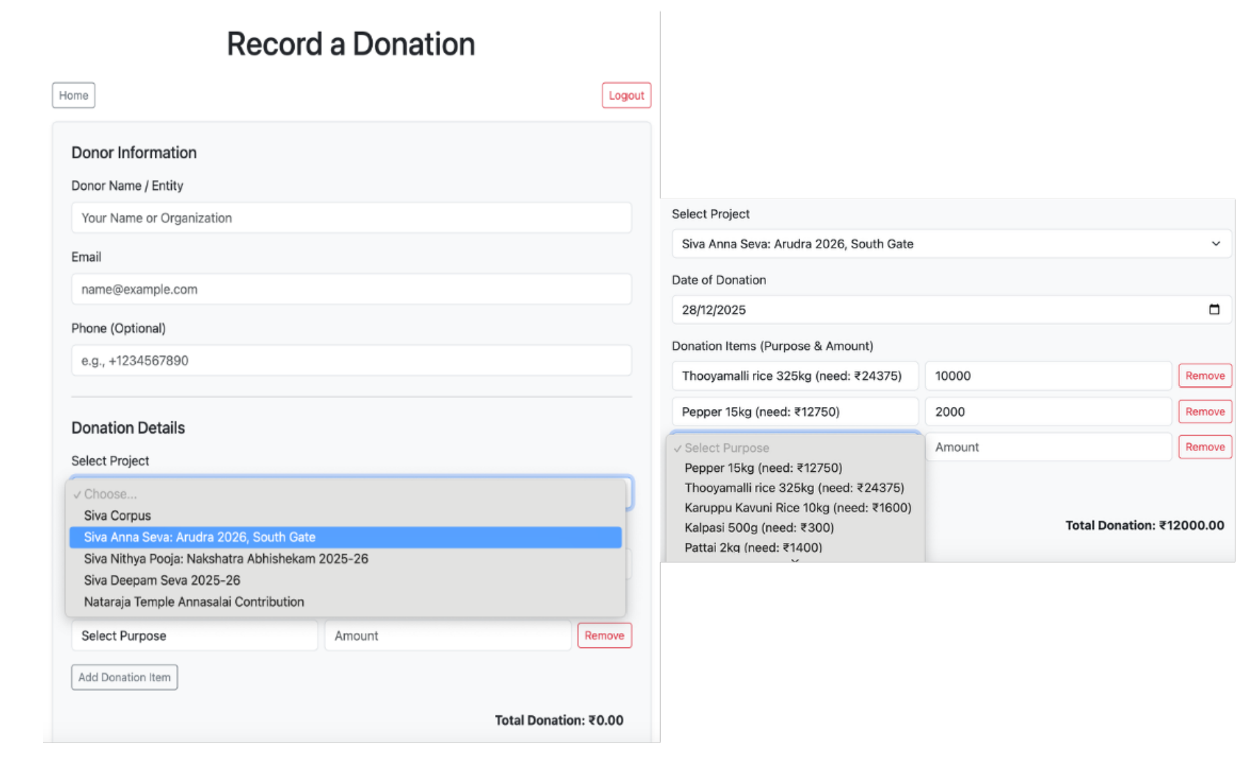
- Donation Details: Select project and add donation items with specific purposes.
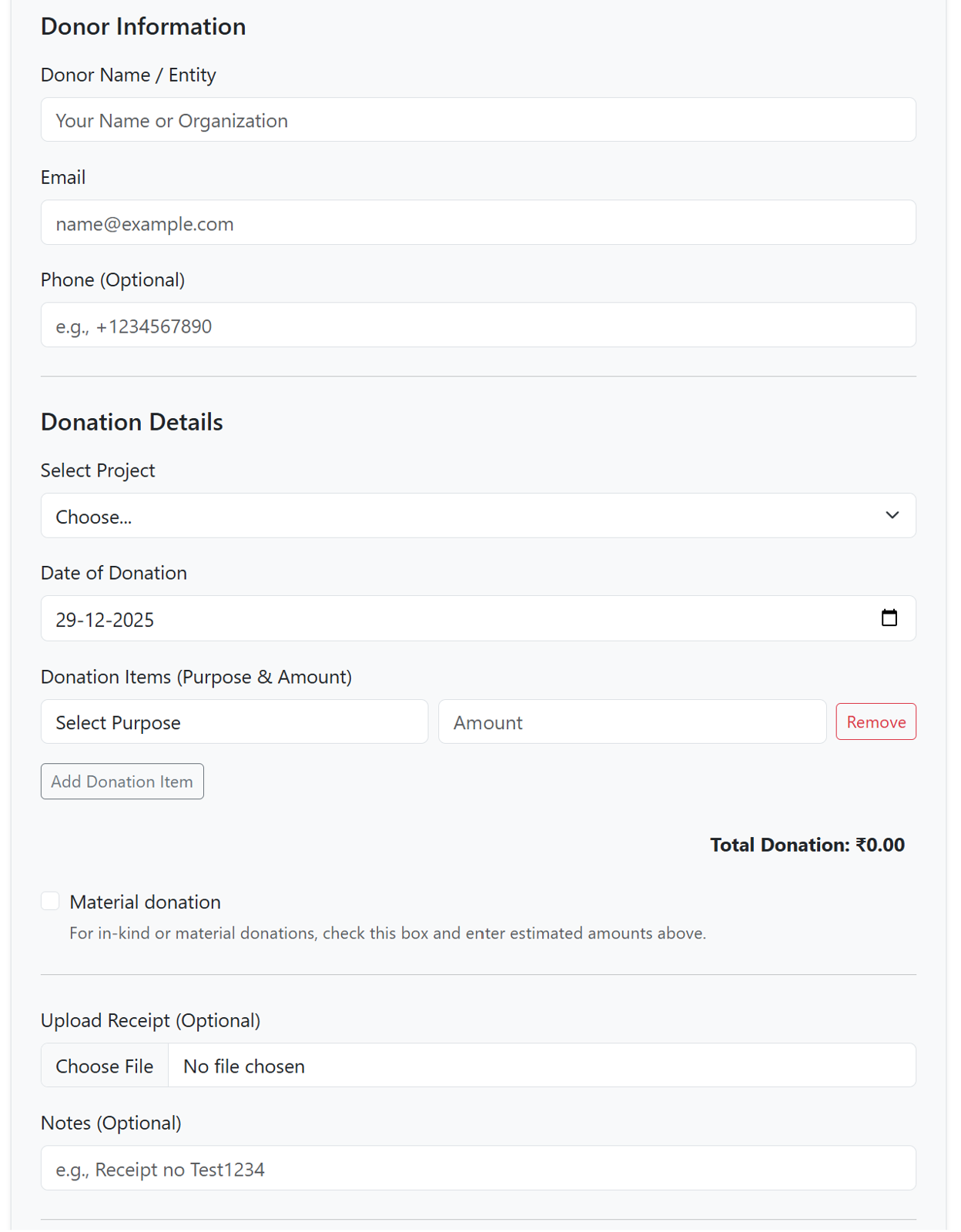
- Material & Receipt: Toggle 'Material' for in-kind gifts and upload your bank transfer receipt.
- Submission: Acknowledge Jeeva Karunyam principles and submit.
⚠️ IMPORTANT CAUTION & GUIDELINES
ONE BANK TRANSFER = ONE THARUNAM ENTRY
This is the most critical rule for reconciliation. Every record in Tharunam must represent exactly one entry on the bank statement.
✅ CORRECT
Transfer ₹200 for Rice (₹100) and Pepper (₹100):
→ Create ONE entry with TWO items. Total: ₹200.
❌ INCORRECT
Transfer ₹200 total as one transaction:
→ Creating separate entries for Rice and Pepper is WRONG.
Before You Begin
- Principle: You must align with Jeeva Karunyam (compassion for all beings).
- Requirements: Name, Email, Project, and at least one item are required.
- Reference: Please include the bank reference number in the 'Notes' field if possible.
📝 STEP-BY-STEP INSTRUCTIONS
Go to tharunam.sivafoundation.org.in and sign in with your Google account.
Click the "Donation" card on the home screen to open the contribution form.
Enter the Donor's Name and Email. Add a Phone number to help the admin reach you for clarifications.
Select the correct Project from the dropdown. This ensures your funds go to the intended cause.
Use the calendar to pick the date that matches your bank transfer. Very important for reconciliation!
For each purpose (e.g., Medicine, Food), select the item and amount. Use "+ Add Item" if your single transfer covered multiple purposes.
Check the "Material donation" box only if you contributed goods (like books or clothes) rather than transferring money.
Upload a screenshot of your bank success page. Add the Transaction ID or UTR number in the Notes field.
Verify the total amount, check the "Compassion for all beings" box, and click Submit.
🏦 BANK STATEMENT VALIDATION
The reconciliation tool ensures that all entries in the Tharunam system perfectly match the official bank records. Follow these steps to validate your records:
Log in to your Central Bank of India net banking portal and download your
transaction statement. The portal typically provides an .xls (Excel) file.
Open the downloaded Excel file and save it as a CSV (Comma Separated Values)
file.
Note: Delete any empty sheets and leave the main sheet exactly as is
without editing any fields. The system relies on the original structure (header lines and
columns) to parse accurately.
Navigate to the "View" page and click on the "Bank Validation" tab at the top.
Click the "Choose File" button to select your CSV, then click "Validate". The system will compare every record based on date, amount, and type.
The system will generate two tables if discrepancies exist:
- Bank Transactions NOT in Tharunam: Items in the bank statement that you haven't recorded yet.
- Tharunam Transactions NOT in Bank Statement: Your records that don't have a corresponding bank entry.
Click "Download Matched Sheet" to get a full CSV report. This sheet links your entries to bank descriptions and is essential for final audit records.
🛠️ TROUBLESHOOTING & COMMON ISSUES
Form says "Email is required" but I filled it
I can't find the button to add more items
I made a mistake after submitting
❓ FREQUENTLY ASKED QUESTIONS (FAQ)
Q1: Do I have to use Tharunam to record my donation?
Yes, it is the official record-keeping platform. It ensures transparency and helps the Foundation with audit compliance.
Q2: Can I record a donation on behalf of someone else?
Yes. Enter the actual donor's name and contact details (the person whose name appears in the bank records).
Q3: What does the Jeeva Karunyam checkbox mean?
It represents "compassion for all beings" and reflects our commitment to ethical sourcing and ahimsa (non-violence).
✅ QUICK CHECKLIST - BEFORE YOU SUBMIT
- Donor Name is filled in (required)
- Email address is filled in (required) and correct
- Phone number is filled in (optional but recommended)
- Project is selected from the dropdown
- Donation date is set to the date of your bank transfer
- At least one donation item is added with Purpose and Amount
- Total amount in items matches your bank transfer amount
- Bank transfer reference number is added in the Notes field
- Material donation checkbox is marked if this is in-kind donation
- Receipt is uploaded if available (optional)
- Jeeva Karunyam checkbox is checked (required)
- All information has been reviewed for accuracy
🙏 Thank You
Your systematic approach to record-keeping allows the Foundation to focus more on its mission.
© 2026 Siva Foundation | Version 2.0